Background Tasks
Feb 2020. Andy writing this to help myself understand what we have. Will add a few illustrative screenshots
What are they?
In web development, when a user triggers something (e.g. hitting a button) it's important that we return control quickly to the user, or send them to the next page. So if a job will take a while (more than a fraction of a second), the usual approach is to somehow put it in a stored queue (like a database table), to be run later. One or more background processes (think of another console while developing) run which constantly watch the queue, grab the next job, and do it. ReportLab's approach is to detach a separate process for each job (explained further down).
At this point, our lives get more complex forever.
Tasks are usually implemented as a function decorator. When you call it, some magic happens to make them run soon after, in the separate process. So, you can call a task in a view, or as a model is saved (possibly as a result of a view); the user gets a quick response.
Here's an example accessed from our manage screens - it just 're-saves' all competitors in a competition, causing certain calculations like age groups, which could take a minute for 300 people or so. The comment suggests that if two meeting directors click this in quick succession, or one clicks again before the first task has finished, nothing will happen, which is what we want.
@task  # fail silently without exception if duplicate
def save_competitors(comp_id):
    comp = Competition.objects.get(id=comp_id)
    cptrs = comp.get_competitors()
    print('saving %d competitors...' % cptrs.count())
    for cptr in cptrs:
        cptr.save()
    print('done')
Keeping an eye on background tasks
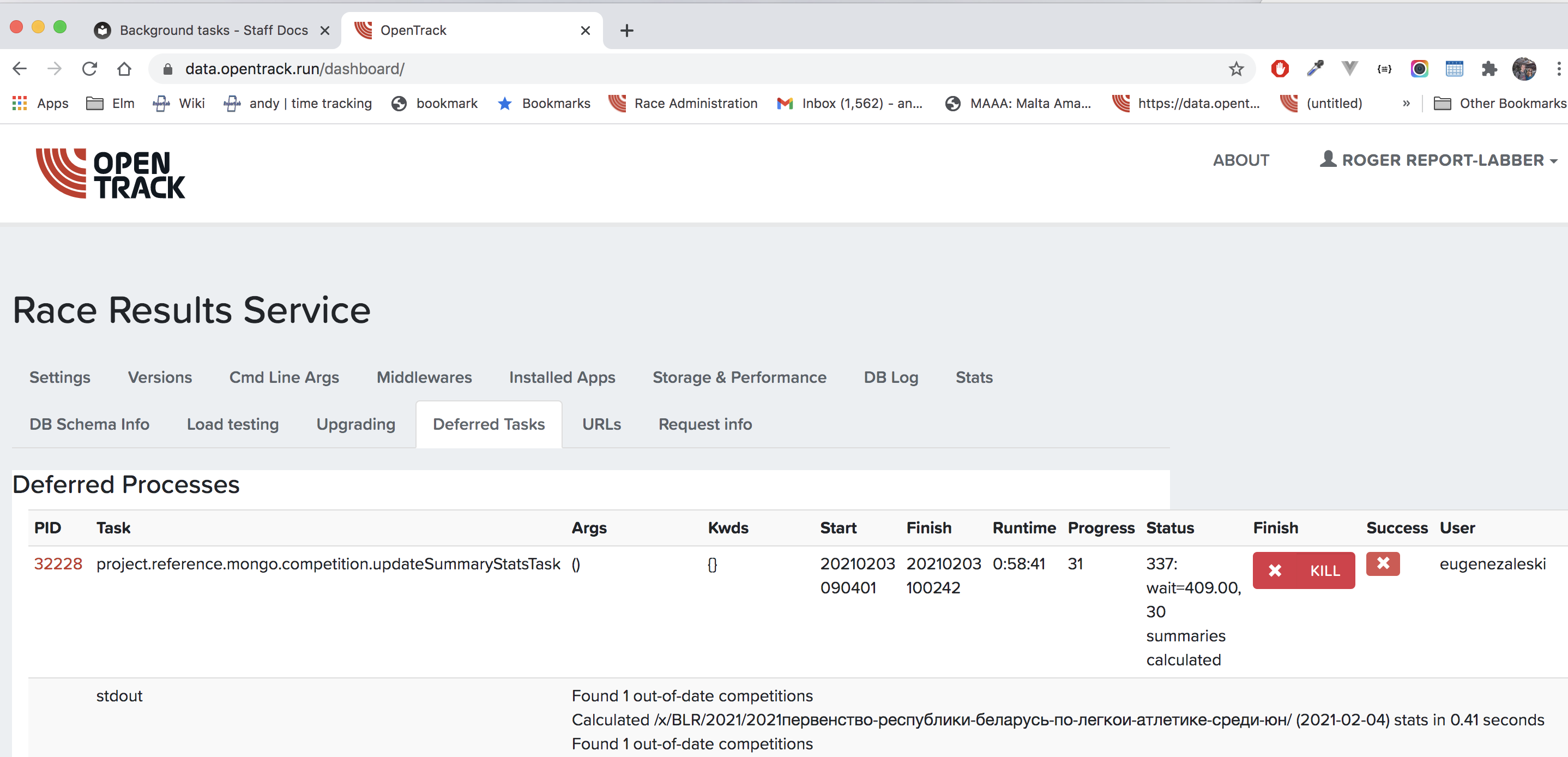
We have two tools for this: the best one is a tab in our dashboard which lets you see the output, how long it's been running, time to die etc:
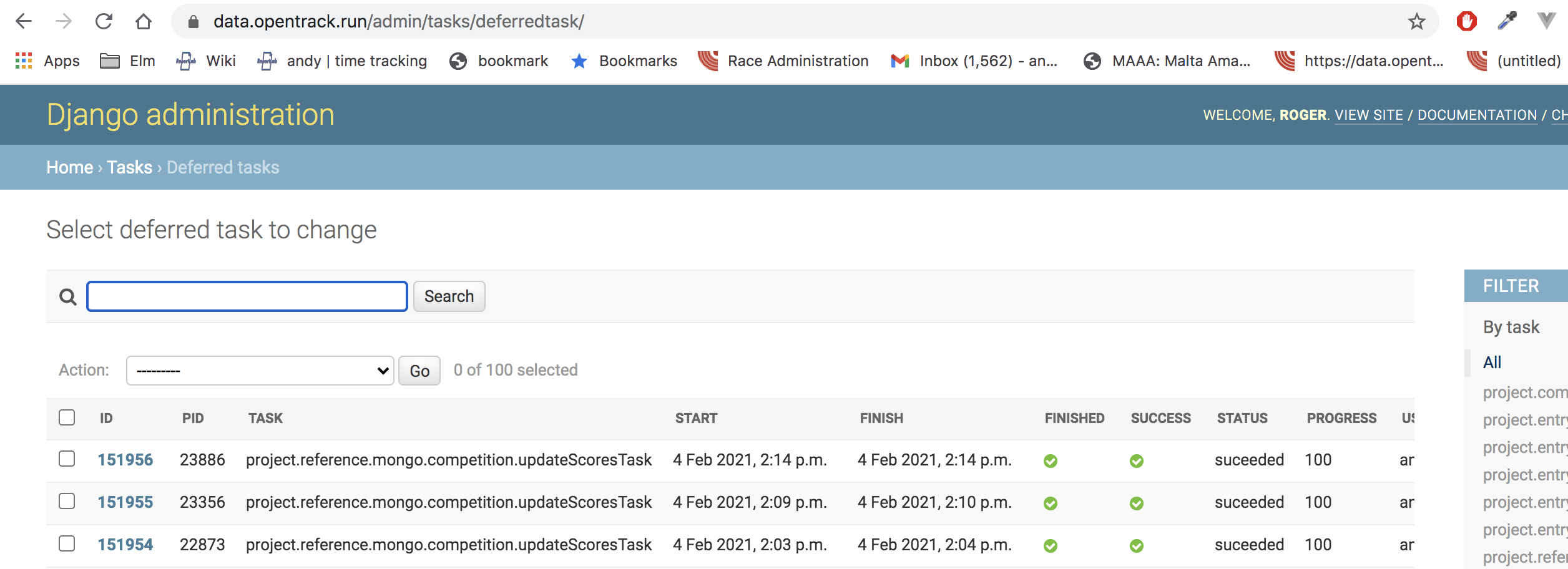
There's also a table in the admin
What's important about writing task functions
Tasks involve separate processes so need a framework to manage them. If one gets it wrong, one can end up with the server being busy with the same job hitting an error and beng re-run forever (or until we notice); 'zombie' operating system processes lurking around consuming memory and resources; or identical tasks being kicked off hundreds of times when once would have done.
It's important that task functions...
- don't run too often (this is our unsolved problem)
- exit quickly if there is nothing for them to do (or loop, and die eventually)
- handle their own errors, so they can always "finish" in an orderly manner even if they hit bad or unexpected data, and report problems back to us.
- don't accidentally kick off avalanches of other tasks
Tasks triggered by competition changes
We have a timestamp field on an SQL competition record (date_modified). We also have save hooks on the various Mongo records that make up a Competition: Competitor and Unit are the main ones. When these are saved, they call a method update_sql_date_modified on the Competition they belong to. This does 3 things:
- set the
date_modifiedtonow - invoke the
updateScorestask below, if the competition has scoring tables - invoke the
updateSummaryStatstask below
This happens a LOT - look at Deferred Tasks in the admin. We are worried that we might be creatng a lot of processes or leaving them around, or at least doing needless work. We might also have got in a muddle with our timestamps. This code needs careful review, and also a spec of what they SHOULD do. So we are trying to rationalise these.
Running bg tasks locally
To run the background tasks locally:
python manage.py process_tasks
Adding the --dev flag will autoreload (watch for file changes with StatReloader) without --dev flag, you would need to rerun the above line each change that is made to a background task function. However, at times it becomes stuck and does not automatically autoreload.
Background task progress bar
For some background tasks it makes sense to have a progress bar displayed for the user. Some of the example tasks below will show a progress bar underneath the header of the page (screenshot below). The bar displays infomation such as:
- the name of the task
- progress
- runtime
- status
- user who initiated the task
- a log of all the print statements.
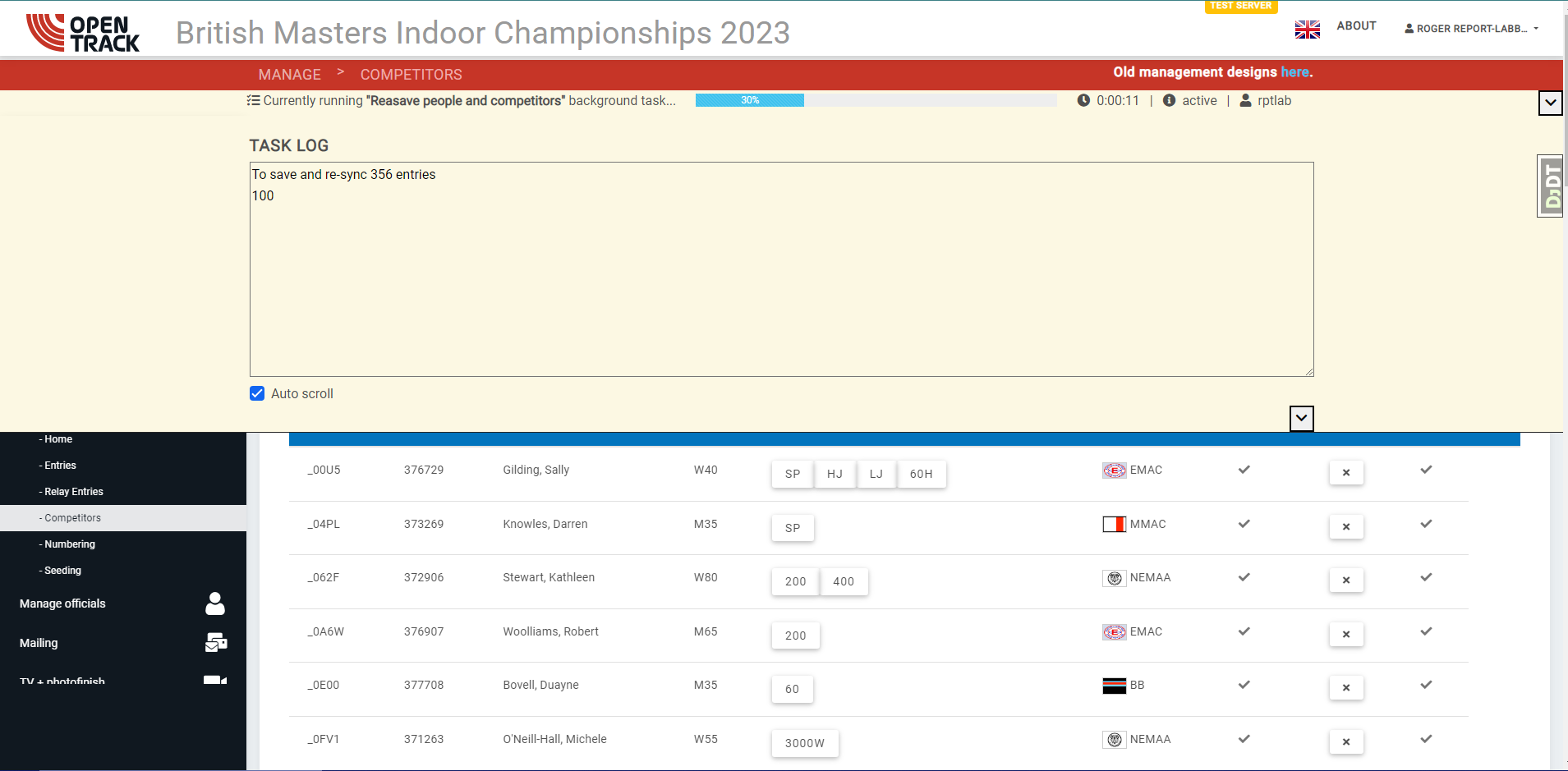
It is also worth mentioning the background tasks tab for competitions (see screenshot) which lists all the background tasks related to the competition.
Setup for bg progress bar
Standard django_background_tasks decorator
@background(remove_existing_tasks=True)
Progress bar decorator
@taskInfoWrapper
Full example can be found in (project/reference/easync.py):
@background(remove_existing_tasks=True)
@taskInfoWrapper
def bg_synchronise_club(org_id, comp_id, test_api_data=None):
    "Synchronise in the background"
    result = None
    try:
        result = synchronise_club(Organisation.objects.get(id=org_id), test_api_data)
    except Exception as e:
        setPrint("Error: %s" % (e))
    setProgress(100, finish=utcnow(), status='finished')
    return result
Creating the bg task:
bg_synchronise_club(org_id, str(comp_id), verbose_name="EA Sync task (%s)"%(org_code), creator=request.user)
List of the main background tasks
project.reference.mongo.competition.updateScoresTask
This is triggered when a competition's timestamp is updated. It then compares the timestamps on the ScoringTables in the competition, and if they are older, recalculates them. So if you change someone's team, or age, or their result, then the match-winning team may change. It ONLY rewrites scoring tables, one specific type of Mongo record, so should not trigger any other tasks.
This currently runs once on a specific competition and exits, so you see "lots of instances". We're planning to change it to loop over competitions needing score-updates, and keep running while there is work to do; so only one task might run on a Saturday afternoon, and die that night some time
With a virtual competition, it runs every time someone submits a result. And if it kicks off a lot of work to do 10 scoring tables for a 3000-person virtual race, we ought to think if we can be smarter, and just "not run so often". Generally, virtual competitions need scores a bit less urgently than real matches, where people might be watching live.
Update 3 Feb 2020: I made the obvious change to competition.py where this is called: if a competition has no scoring tables, I just don't invoke the task.
Idea 1: if we could somehow rate-limit this, and say it won't run on the same competition more than once every five minutes, it would calm things down a lot
Idea 2: turn it to a singleton process like updateSummaryStats: it loops, finding competitions needing work, and there is never more than one updateScores task working. On one weekend there might be up to 10 competitions doing the work.
Idea 3: Competition can have a last_scored timestamp, bumped when ScoringTables arw saved. This will allow the task to internally implement Idea 1 above, by querying for competitions where timestamp A is less than timestamp B.
project.reference.mongo.competition.updateSummaryStats
This "runs forever" when invoked. It looks for competitions where the summary record (how many competitors, what's 1st/10th/100th 10th best performance etc) is older than a timestamp on the competition; goes through all results in the competition age-grading them and noting the highlights (for the competition front page); updates the 'date modified', and then moves onto the next competition. Then it sleeps for a bit, and starts again.
The way docengine's tasks work mean that only one of these processes be running at once. So we can invoke it on every competition change, and we hope the invocation is cheap.
Idea 1: some kind of rate limit on this would be good: if nothing happened lately, update the competition, but if it's been done lately (e.g. in last 10 minutes), skip it.
Idea 2: Competition can have a last_summarised timestamp.
Problem 1: when it hits an error on a competition, it keeps trying again and again. If there was some exponentially-decaying retry strategy (try a few seconds later, then a few minutes later, then a few hours, then a few days, then give up), this would be less trouble.
project.comp.mailing._send_mailing
Sends a batch of emails relating to a competition. e.g., to all 500 people who entered. Mailing could become more frequent in future, as we build tools for the federations to use.
This one will need optimising one day. Must be robust - if one email address fails, continue and report it, OR retry the failure a few times then report it. in COVID it mattered a lot that it had not been possible to deliver to some people.
project.reference.mongo.competition.saveCompetitors
This is run when a competition director clicks a button. It calls save on all competitors in a competition, which might cuse recalculation of age groups, categories and so on.
project.reference.mongo.competition.sync_from_entries
As above, a button to do a batch job. It can take a minute or two for a big competition
project.reference.mongo.competition.pb_lookup
As above, a button to do a batch job. This calls external APIs to look up PB/SB on all competitors. It may take a few minutes
project.comp.views.raceresult_fetch
Calls the servers of race|result, a chip timing company, and fetches all passings (runners crossing mats) for the race in question. Used in 2018 at the Night of 10,0000, and not used since.
project.comp.custom.country_nor.processUploadTask
Do the "heavy part" when Roar uploads a text file with a few hundred competitors, checking their licences against the Norwegian national system
project.entry.models.check_all_licences
project.entry.models.resave_and_sync_people
project.entry.models.resync_all_entries
project.entry.models.resave_all_entries
Batch buttons on Manage | Entries
Possible issues
Background tasks are simple for the most part, but you may encounter some issues:
Task Queued but not running:
There is an issue where your task gets queued, but never run. This is because the higher level folder should have a file called tasks.py that imports that background task. This doesnt seem to be necessary for background tasks defined in views, forms or models.
For example. project/comp/copy_competition.py wants to run a method called copy_comp_task(). To run this you need project/comp/tasks.py and you'd import it like:
from project.comp.copy_competition import copy_comp_task
Discussion: task frameworks and approaches
docengine.tasks is a bit unusual. Rather than us needed to make sure there is a background process always running, restart it if it dies etc, Robin wrote a framework where the main code "detaches a new process" as we invoke a task. I am not smart enough to know if it's brilliant, insane or somewhere in the middle, but it all seems to work. (It would be nice to know the overhead in a Django view of kicking off a task). We also have some nice task_utils functions like setProgress and setStatus which update the database row for each, so a job can report that it is (say) 53% complete; and a web page could poll with an API call and show a progress bar. This is used by the Norway task. Have not seen how to do this in others. I believe that tasks always start immediately.
There are some options for what to do if you create a duplicate of a task already running: exit silently, or raise an exception.
Apart from ours, there are two main types of task managers "out there". distributed ones which can farm out work to other servers and queue managers(Celery/RabbitMQ/Amazon SQS), and simple ones which run on the same box. I would imagine it will be easy to switch task managers and work queues if we end one day up using something of Amazon's, since they all just "run a function" that takes simple serialisable arguments like a CompetitionID or userId.
django_background_tasks
Of the latter, most Django ones use a database table like us, making them easy to debug and consuming less of a developer's limited number of brain cells. I had a play with django_background_tasks (call this "DJBT") and found it very nice. There is a branch feature-background-tasks where they seem to run and work, and it only took an hour or two to switch; I had to strip out setProgress etc. I am not suggesting we abandon docengine.tasks in favour of DJBT but the docs are good and helped understand the "normal" model better.
Other task frameworks
There's a djangopackages grid listing packages. And plenty of task managers that are just lightweight python.
dramatiq presumes RabbitMQ or Redis are installed. Other than that, it looks pretty lightweight. Huey
There are some things which might be worth adding, or maybe we can do already and I don't understand how, so I am writing these to discuss with Robin
-
Delayed invocation: when you call it, tell it to start after 5 seconds, 60 seconds or whatever. I can see this would help "calm the storm" if you save 100 records in a loop and trigger 100 tasks, as you might have done a lot of that triggering before the first one executed, and the framework might be smart enough not to add duplicates to the queue.
-
Retrying on a decaying scale: if DJBT, if a task errors, it will be retried but with declining frequency: a few seconds later, then a few minutes, then a few hours, and the fourth try is 20 hours or so. So, if it failed due to an external network being down, it will retry and pass; but if it fails due to a bug, it won't hammer our system retrying every few seconds.
-
Repeating: you can set a task to repeat, with a frequency and end timestamp, and each time it finishes, it schedules a new copy of itself. This might be an alternative to our
updateSummaryStatswhich essentially tries to run forever. Fine in its own process, not good if being interleaved with other processes.
One I did not find is some kind of "rate limit": don't run more than once per X seconds, even if someone invokes you. This would calm things down a lot. We will probably do that ourselves at app level, by having timestamps on competitions and comparing them.
To be continued until our system is a thing of beauty and elegance.